 ConvertPix
Convert HEIC to JPG on your iPhone — without your photos ever leaving it
ConvertPix is an offline image converter and photo resizer. Turn HEIC into JPG, switch between JPG, PNG, and WebP, batch convert up to 10 photos at once, and compress images by up to 90% — all processed locally on your device.
Free download · No uploads, no waiting · Version 2.1.0
Your iPhone shoots HEIC. The rest of the world wants JPG.
Since iOS 11, iPhones save photos in HEIC by default — great for storage, frustrating for sharing.
The problem
- Windows PCs, older Android phones, and many websites can't open HEIC files.
- Email providers and upload forms reject photos that are too large.
- Web converters make you upload private photos to someone else's server — and make you wait.
- Converting photos one at a time is tedious when you have a whole batch to share.
The ConvertPix answer
- Convert iPhone HEIC photos to JPG instantly — perfect for sharing with non-Apple devices.
- Compress photos from 60–100% quality and reduce file size by up to 90% for email and messaging.
- 100% offline processing: your photos never leave your device. No uploads, no waiting, no privacy concerns.
- Batch convert HEIC to JPG with one tap — up to 10 images per batch.
Every converter you need, in one small app
Format conversion, resizing, and compression — the three jobs iPhone photographers actually need, handled locally.
HEIC to JPG converter
Convert your iPhone's HEIC photos to JPG instantly for sharing with non-Apple devices — and batch convert HEIC to JPG with one tap.
JPG, PNG & WebP
Convert JPG to PNG and PNG to JPG seamlessly, with transparency options for PNG and a WebP converter for modern web formats.
Smart image resizer
Resize with preset sizes including HD, Full HD, and 4K, and optimize picture dimensions for social media posts.
Quality-controlled compression
Compress photos from 60–100% quality and reduce photo size by up to 90% — small enough for email and messaging, still sharp.
Batch processing
Process up to 10 images in one go instead of converting photos one by one.
Private by design
Everything is processed locally for maximum speed and security. No uploads, no server queues, no privacy concerns.
A batch conversion, start to finish
Four real screens from version 2.1.0 — every step below happens on your iPhone, with no network connection involved.
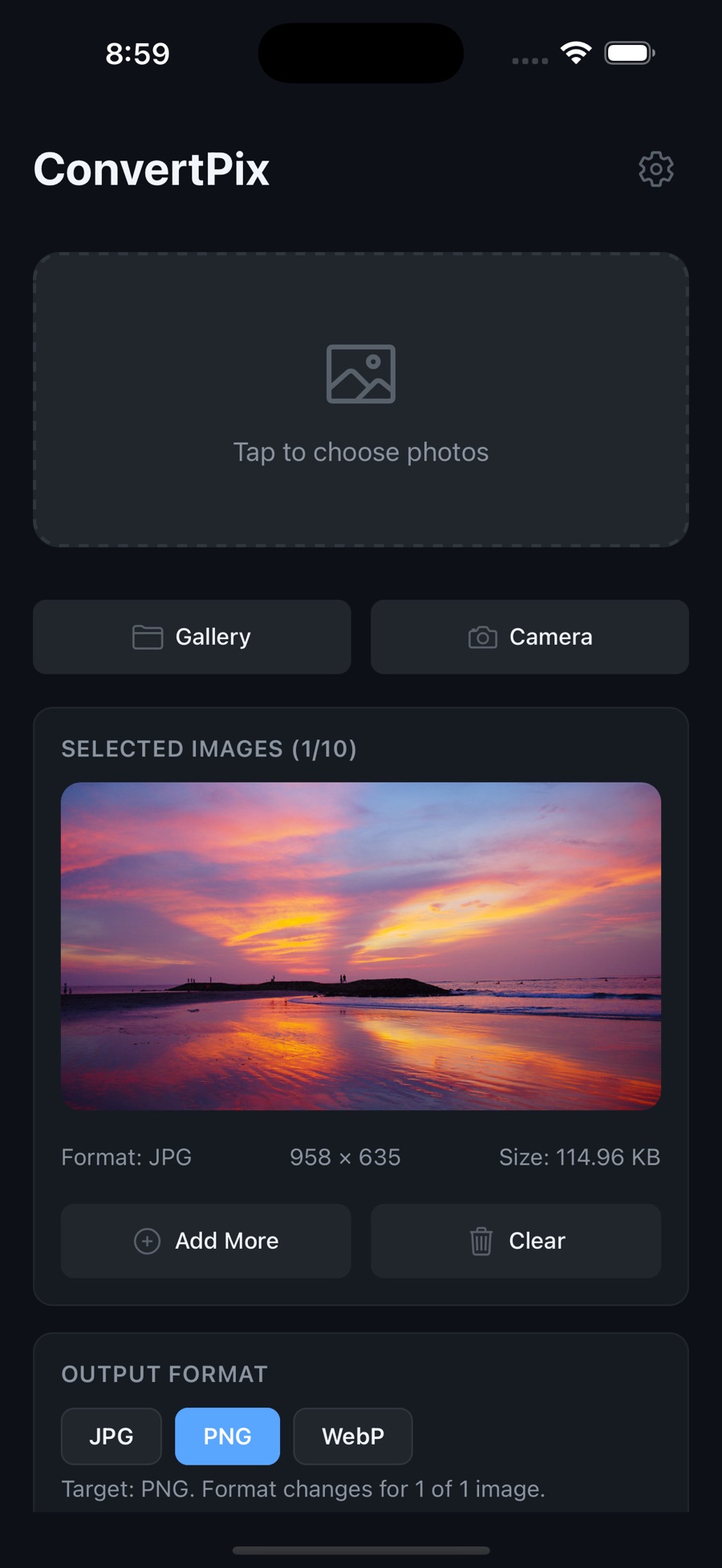
Pick photos from your library or camera
Selected images show their real format, dimensions, and file size up front, so you know exactly what you're working with before anything is converted.
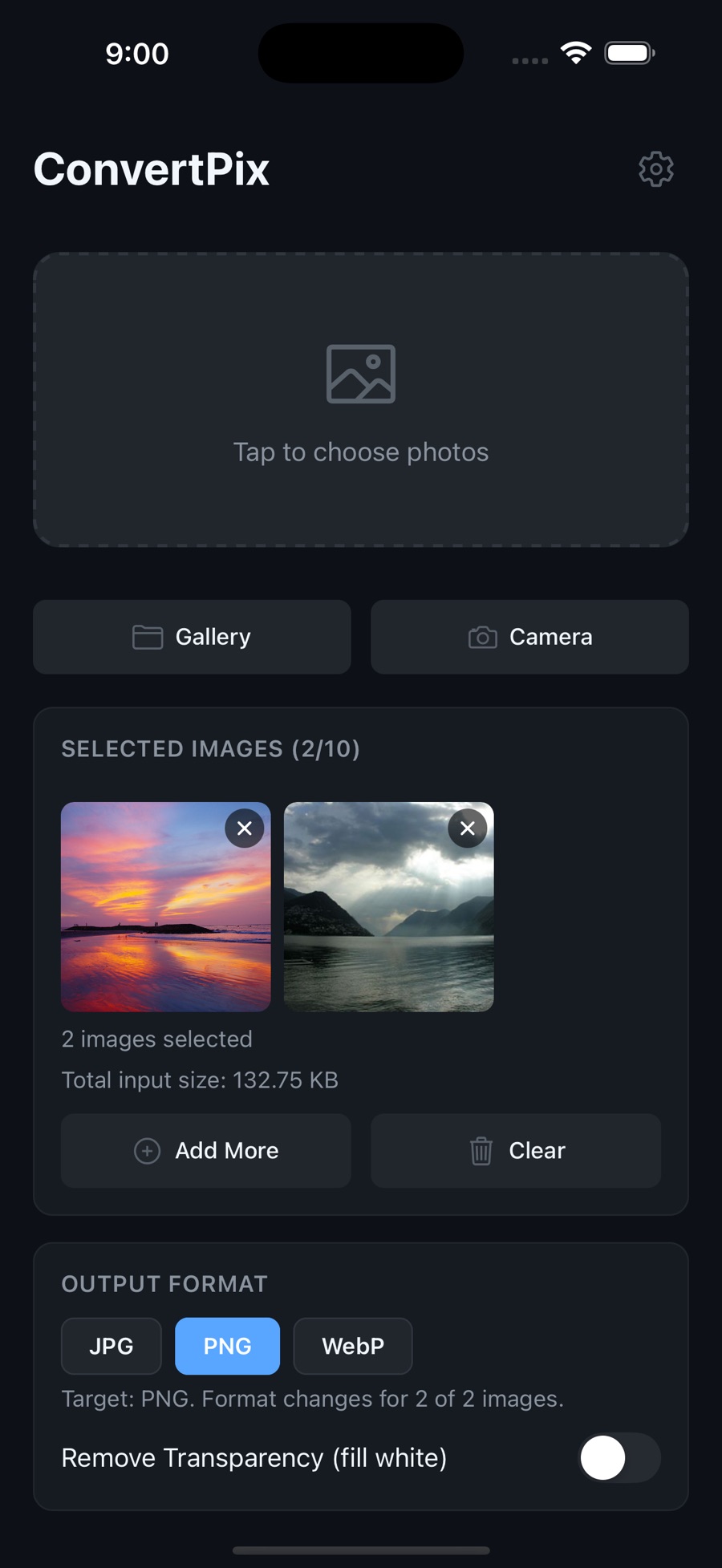
Queue up to ten at once
Add more images until the batch is full. The running total input size tells you how much you're about to process.
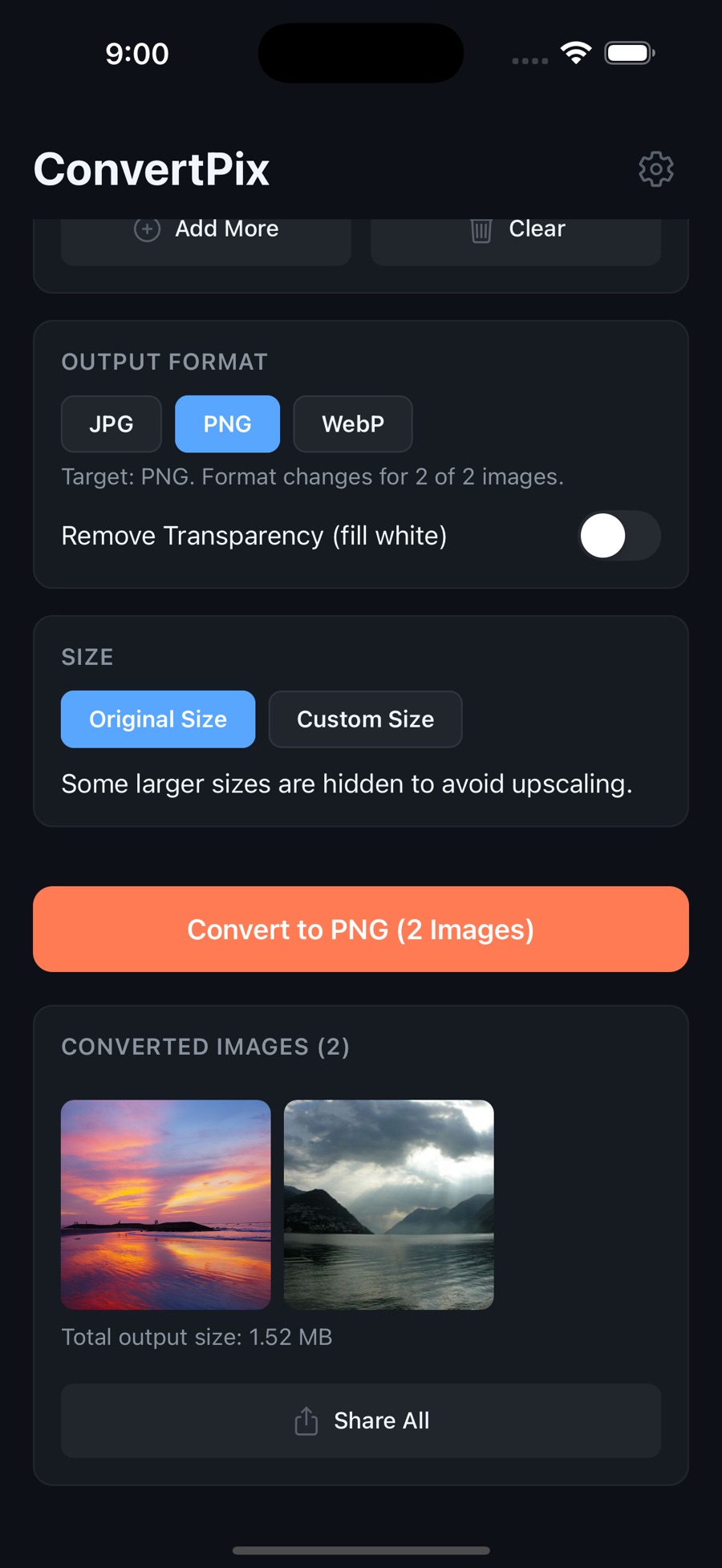
Convert the whole batch in one tap
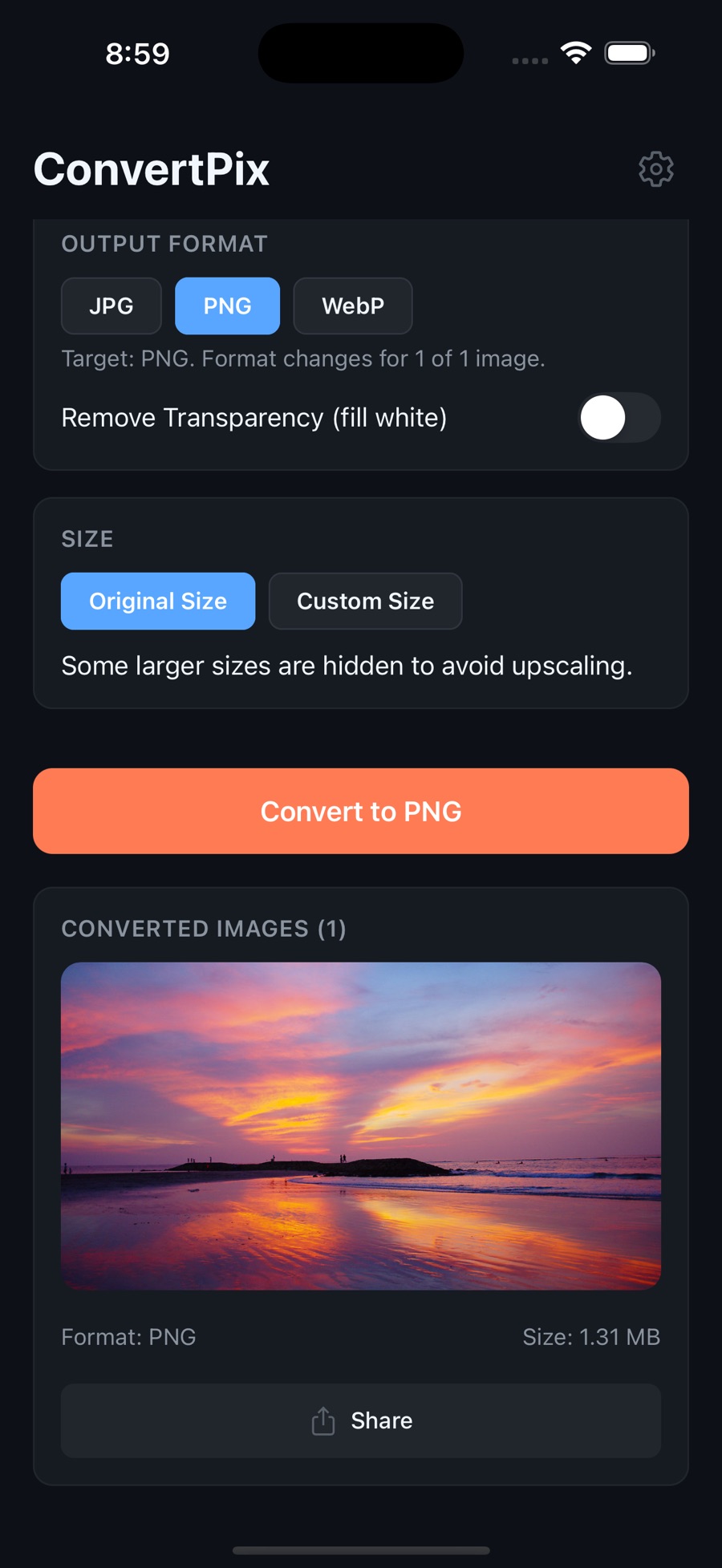
Choose JPG, PNG, or WebP, decide whether transparency is flattened to white, then send every result out together with Share All.
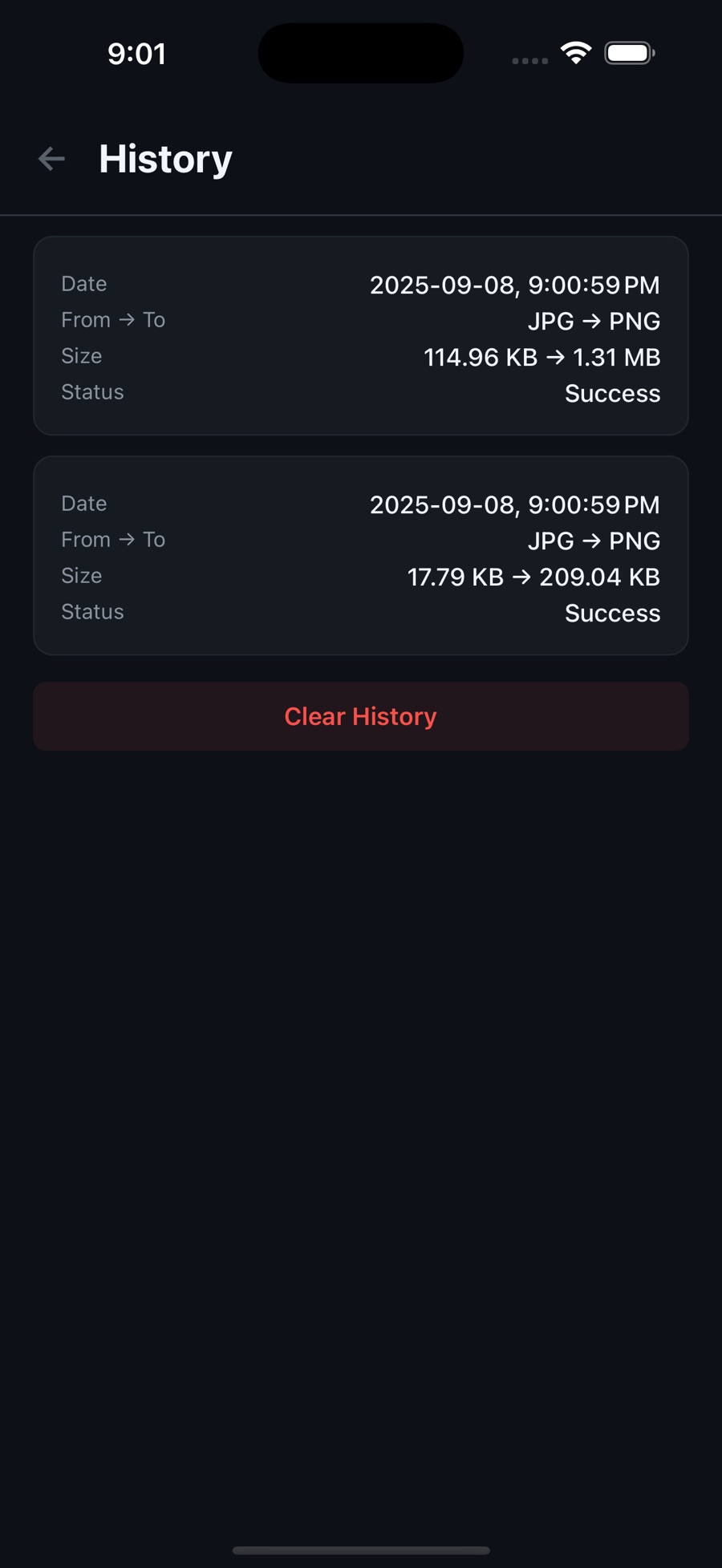
Check what changed — then clear it
History records each conversion with its before and after size, so you can see what compression actually bought you. One tap wipes the log.
How ConvertPix fits into your day
A converter is only useful when it removes friction. Here's where ConvertPix earns its place on your home screen.
-
Share anywhere
A HEIC photo that won't open on a friend's Windows laptop or Android phone becomes a universally compatible JPG in seconds — offline, even on a plane.
-
Beat upload limits
Job applications, web forms, and email attachments often cap file sizes. Compress photos before sharing and reduce photo size to sail under any limit.
-
Reclaim storage
Reducing photo size by up to 90% adds up fast. Shrink copies of large images before archiving or sending to save space on your device.
Frequently asked questions
Straight answers about pricing, privacy, and what the app can do.
Yes on iOS. ConvertPix is listed as a free download on the App Store; the Android version on Google Play is a $4.99 one-time purchase (US price at time of writing). You can convert HEIC to JPG, use the PNG and WebP converters, resize, and compress photos with the app.
No. ConvertPix works 100% offline. Your photos never leave your device — there are no uploads and no waiting on a server, which also means conversions work without an internet connection.
ConvertPix converts HEIC to JPG, JPG to PNG, PNG to JPG, and supports WebP for modern web formats. The PNG converter includes transparency options.
Yes. The batch photo converter processes up to 10 images at a time, including batch converting HEIC to JPG with one tap.
You stay in control. ConvertPix lets you compress photos anywhere from 60% to 100% quality, and can reduce photo file size by up to 90% while maintaining quality — useful for email, messaging, and saving storage.
ConvertPix is a universal iOS app for iPhone and iPad (iOS 15.1 or later) and is also available on Google Play for Android. The iOS download is about 32 MB.
ConvertPix is localized in more than 30 languages, including English, Spanish, French, German, Japanese, Korean, Chinese, Arabic, Portuguese, and Russian.
Guides: image formats, sizes & compression explained
Practical, evergreen answers to the questions behind the conversions.
HEIC vs JPG: What's the Difference, and When Should You Convert?
Why iPhones shoot HEIC, where it breaks, and when converting to JPG is the right call.
Read the guide → CompressionHow to Reduce Photo File Size on iPhone Without Wrecking Quality
What actually makes photos big, how quality settings work, and how far you can shrink safely.
Read the guide → FormatsJPG vs PNG vs WebP: Choosing the Right Image Format Every Time
Transparency, compression types, and browser support — a working decision framework.
Read the guide → ResizingImage Sizes for Social Media and the Web: A Practical Resizing Guide
Why platforms recompress your photos, what HD / Full HD / 4K actually mean, and how to prep images that stay sharp.
Read the guide → ComparisonThe Best HEIC to JPG Converter Apps: An Honest Comparison
Apple's built-in options, free desktop tools, and web services compared on platforms, price, offline use, and accounts.
Read the guide →Ready to convert without compromising your privacy?
Download ConvertPix free on the App Store. HEIC to JPG, PNG, and WebP conversion, batch processing, resizing, and compression — all 100% on your device.